When you’re auditing pages, researching keywords, or validating technical fixes, the last thing you want is to juggle multiple desktop tools and browser tabs. Modern SEO work happens in the browser, and the right extensions turn your workflow from scattered to streamlined.
This guide covers 11 SEO browser extensions that deliver real value without the bloat. We’ve tested each one for reliability, maintenance frequency, permission requirements, and practical utility. These aren’t just feature lists—they’re tools that solve actual problems you face daily.
Whether you’re doing quick page checks, deep technical audits, or competitive research, there’s an extension here that fits your workflow. We’ll show you what each tool does best, where it falls short, and how to combine them for maximum efficiency.
Table of Contents
- 1. Sprout SEO Extension
- 2. SEOquake
- 3. MozBar
- 4. Ahrefs SEO Toolbar
- 5. Keywords Everywhere
- 6. Keyword Surfer
- 7. Detailed SEO Extension
- 8. Plerdy
- 9. Wappalyzer
- 10. Check My Links
- 11. Redirect Path
- Selecting the Right Extensions for Your Workflow
- Security and Privacy Best Practices
- Installation and Management Tips
- Comparison Table: Quick Reference
- Conclusion
- Frequently Asked Questions
- What's the best extension for comprehensive SEO audits?
- Are browser extensions safe for client work?
- Do extensions slow down my browser?
- How many extensions should I install?
- Can extensions replace enterprise SEO platforms?
- Which extensions provide the best SEO scoring?
- Should I use multiple extensions that do similar things?
- Get Started Today
1. Sprout SEO Extension
Best for: Complete SEO audits, technical validation, and SERP intelligence
Sprout SEO delivers everything you need for comprehensive SEO work in one extension. It combines on-page analysis, technical checks, and SERP insights into a unified workflow that eliminates tool switching.
What Makes It Different
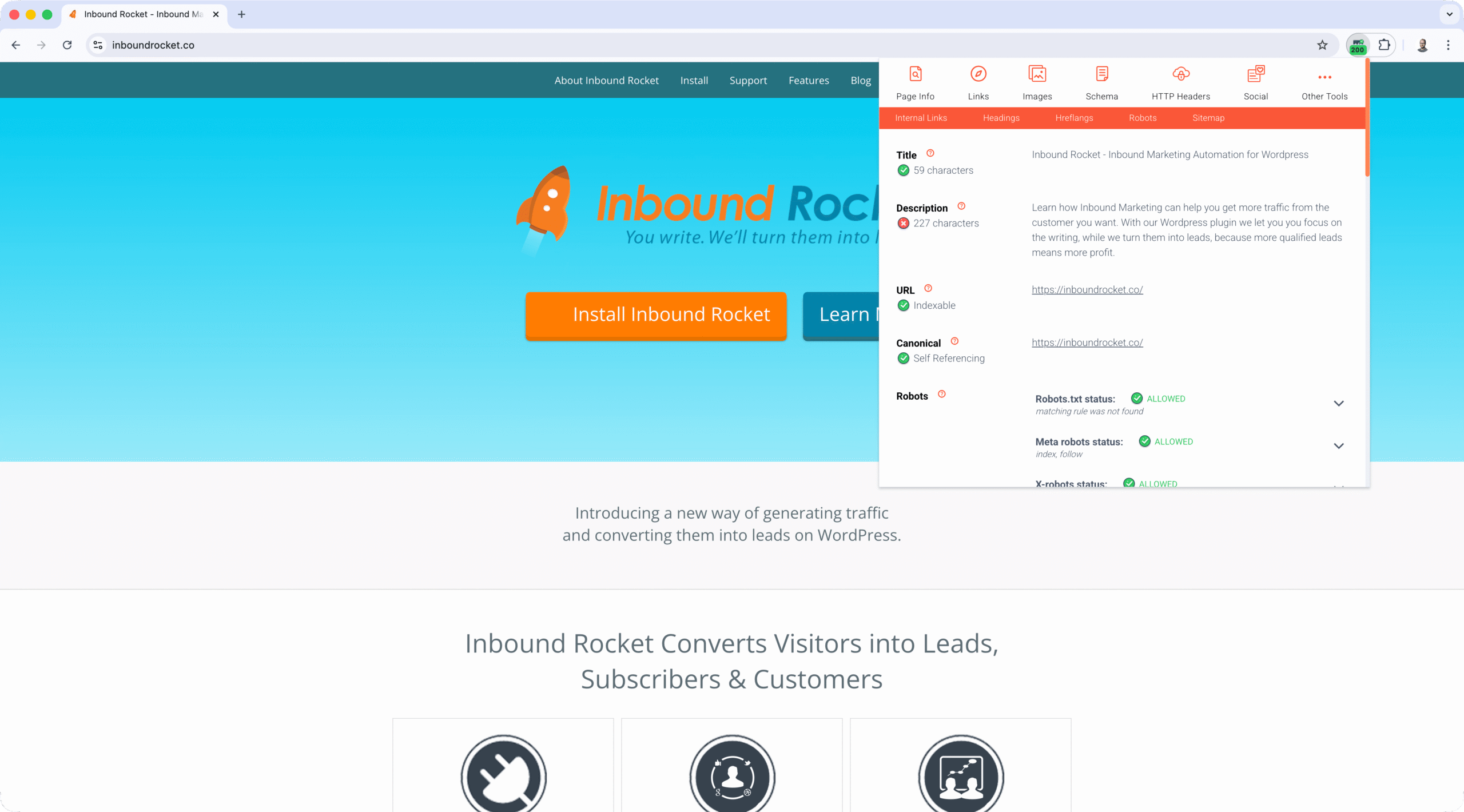
Comprehensive On-Page Analysis
Get instant visibility into title tags, meta descriptions, heading structures, canonical tags, and robots directives. The extension validates character counts, flags duplicates, and surfaces issues that could hurt rankings.
Advanced Technical Validation
Beyond surface-level checks, Sprout SEO handles the technical details that matter: robots.txt validation, sitemap discovery, redirect chain tracing, hreflang back-reference checking, and broken link detection with HTTP status codes. These aren’t just nice-to-haves—they’re essential for preventing crawl and indexing problems.
Rich SERP Integration
The extension enriches Google search results with Google Trends data, helping you spot rising queries before competitors. A location changer lets you test local SEO across different markets. The People Also Asked (PAA) scraper extracts questions for content planning, and an integrated keyword planner provides volume estimates without leaving search results.
Real User Performance Metrics
Sprout SEO pulls Core Web Vitals from Chrome User Experience Report (CrUX), showing Largest Contentful Paint (LCP), Interaction to Next Paint (INP), and Cumulative Layout Shift (CLS) for the current page. More importantly, it displays CWV metrics for every ranking result in a SERP overlay, giving you competitive performance context that’s hard to find elsewhere.
Structured Data Validation
The extension detects JSON-LD markup and provides direct links to Google’s Rich Results Test and Schema.org validator. Copy schema to your clipboard for quick analysis or developer handoffs.
Powerful Context Menu Integration
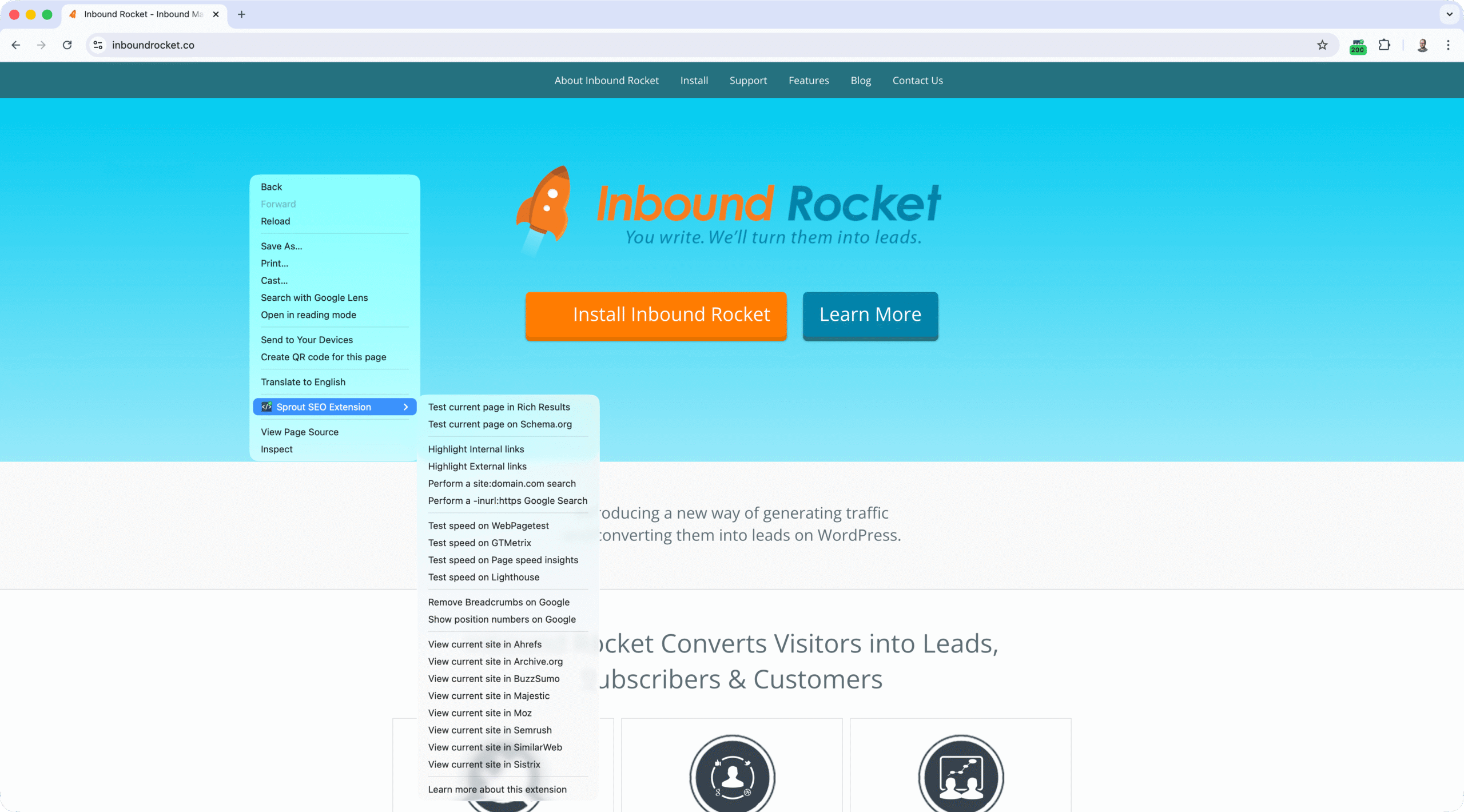 Right-click anywhere on a page to access quick SEO actions without opening the extension popup. Launch Rich Results Test or Schema.org validator for the current URL, toggle JavaScript on/off to test rendering differences, or view rendered source for JavaScript-heavy sites. Highlight internal and external links for instant link analysis, or run quick
 site: and -inurl: Google searches. Send pages directly to WebPageTest, GTMetrix, PageSpeed Insights, or Lighthouse for performance testing. On Google SERPs, remove breadcrumbs or show position numbers for cleaner analysis. Jump to external tools like Ahrefs, Semrush, Moz, Majestic, SimilarWeb, Sistrix, Archive.org, SE Ranking, and BuzzSumo with the current site pre-filled—no copying URLs. This context menu turns every page into a launchpad for rapid SEO checks.
Additional Features
- Automated broken link detection with HTTP status checking
- Complete Open Graph and Twitter Card preview and validation
- CSV exports for images, links, headings, and content
- Archive.org integration for downloading page CSVs during migration analysis
- JavaScript toggle and rendered source viewer for JavaScript-heavy sites
- 18+ SEO tool integrations via context menu
- Automated SEO score (0-100) with prioritized recommendations
- Reddit integration in the social tab for discussion signals
Why SEOs Choose Sprout SEO
Most extensions focus on one area—on-page, technical, or SERP analysis. Sprout SEO covers all three in a workflow-first design. You can run complete audits, validate technical elements, and gather SERP intelligence without leaving your browser. The combination of automated scoring, export capabilities, and tool integrations makes it ideal for agencies, in-house teams, and consultants who need to move fast.
Real-World Applications
Rapid Page Assessment
One-click audits capture title, meta, canonicals, headers, robots directives, word count, hreflang, and structured data. You get an instant health snapshot that helps prioritize fixes.
Pre-Launch Technical Checks
robots.txt validation, sitemap analysis, redirect chain tracing, and broken link detection prevent issues before they impact rankings. Essential before migrations, launches, or major campaigns.
SERP-Driven Content Strategy
Google Trends, location changer, and PAA scraper help you make smarter content decisions directly in search results. No more copying queries into separate tools—you get context where you’re already working.
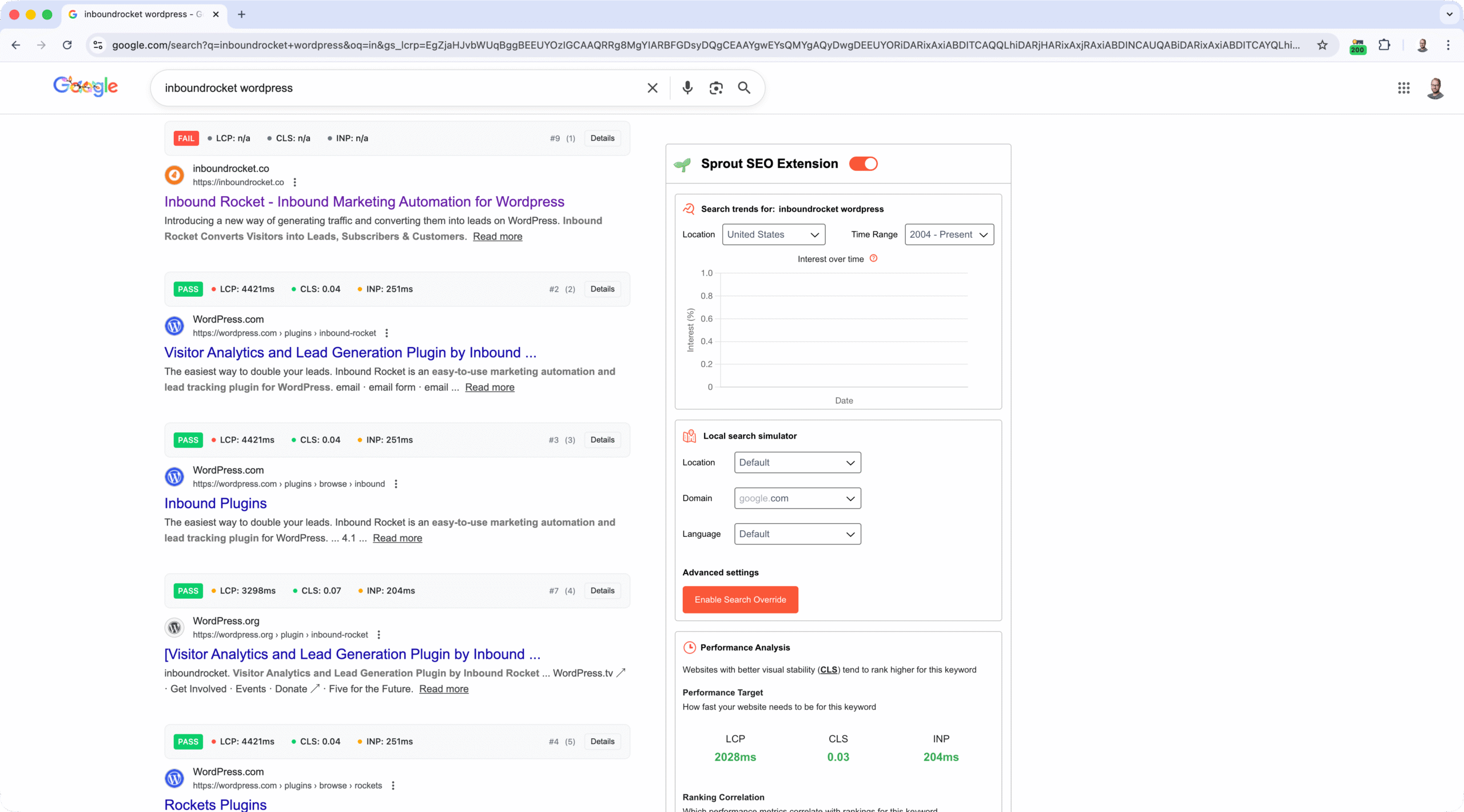
Sprout SEO offer a comprehensive side panel in the SERP
Developer-Ready Exports
CSV exports for images, links, headings, and content enable clean handoffs to developers and content teams. Standardized formats make it easy to create tickets, briefs, and reports.
Performance Prioritization
CrUX-based LCP, INP, and CLS metrics help you focus on pages that affect real users. The SERP overlay showing CWV for all ranking results provides competitive context that’s rare in browser extensions.
Typical Workflow
Install Sprout SEO, open any page, and run an instant audit. The extension surfaces title and meta tags, validates canonical URLs, checks robots directives, traces redirect chains, and displays Core Web Vitals from CrUX. Export findings to CSV, copy meta tags to content briefs, and use CrUX indicators to prioritize performance fixes. Everything you need for evidence-based tickets and stakeholder reports, all without leaving your browser.
Pricing: Free to use with all current features available
Browser Support: Chrome, Firefox, Edge
Install: Chrome Web Store | Firefox Add-ons | Edge Add-ons | Website
2. SEOquake
Best for: SERP metric overlays and quick competitive analysis
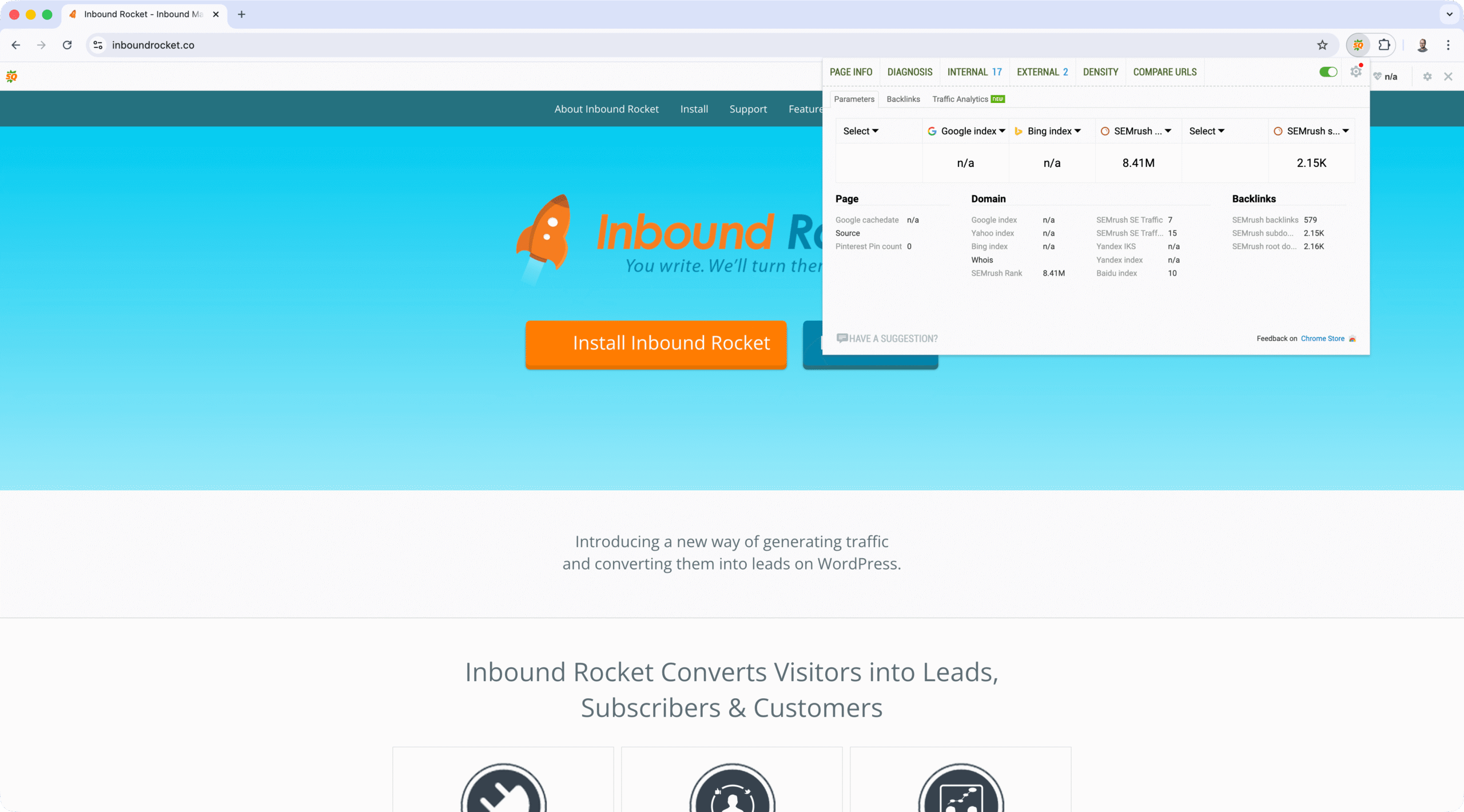
SEOquake from SEMrush provides a comprehensive metric overlay directly in search results and on web pages. It works standalone or integrates with SEMrush for premium features.
Key Capabilities
SEOquake’s SERP overlay shows Domain Authority, Page Authority, backlink counts, and social signals for every search result. On any webpage, you can run on-page audits that analyze keyword density, internal and external link distribution, and social metrics. The extension also supports data exports for reporting.
Why It’s Valuable
SEOquake delivers one of the most complete metric overlays available, giving you instant context about any page’s SEO strength before clicking through. While it integrates with SEMrush, many features work without a subscription.
Pricing: Free (premium features require SEMrush account)
Browser Support: Chrome, Firefox
Install: Chrome Web Store | Website
3. MozBar
Best for: Domain Authority metrics and link analysis
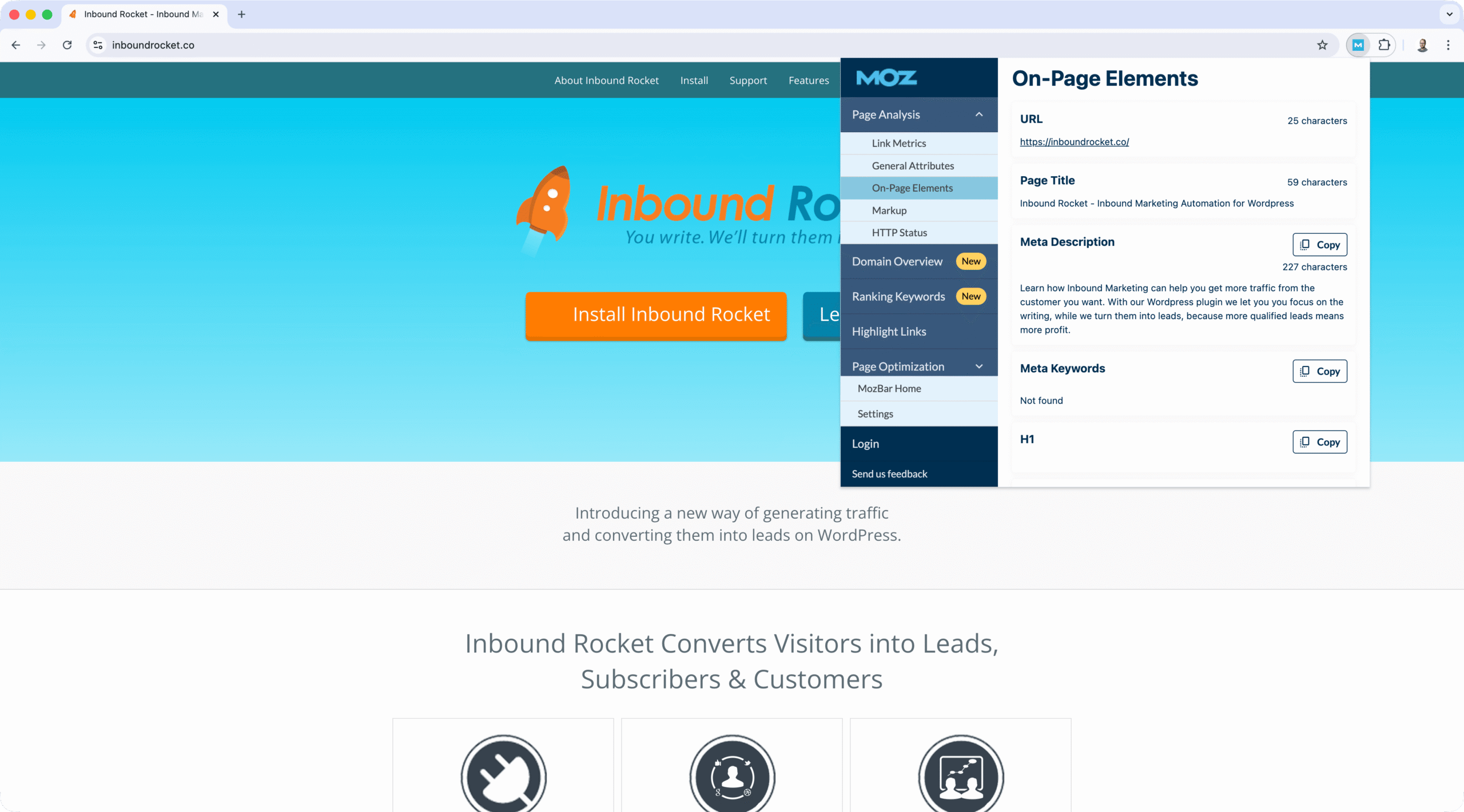
MozBar is Moz’s official browser extension, providing instant access to Domain Authority (DA), Page Authority (PA), and link metrics in search results and on pages.
What It Does
The extension displays DA and PA scores alongside link metrics including total links and linking root domains. It highlights on-page elements like nofollow links and meta descriptions, and provides quick access to Moz’s full platform.
Why Moz Users Need It
MozBar is essential for Moz subscribers, offering seamless integration with Moz’s platform. The Domain Authority metric is widely used in link building, making this extension valuable for outreach and competitive analysis.
Pricing: Free (premium features require Moz Pro subscription)
Browser Support: Chrome, Firefox
Install: Chrome Web Store | Website
4. Ahrefs SEO Toolbar
Best for: Backlink intelligence and keyword rankings
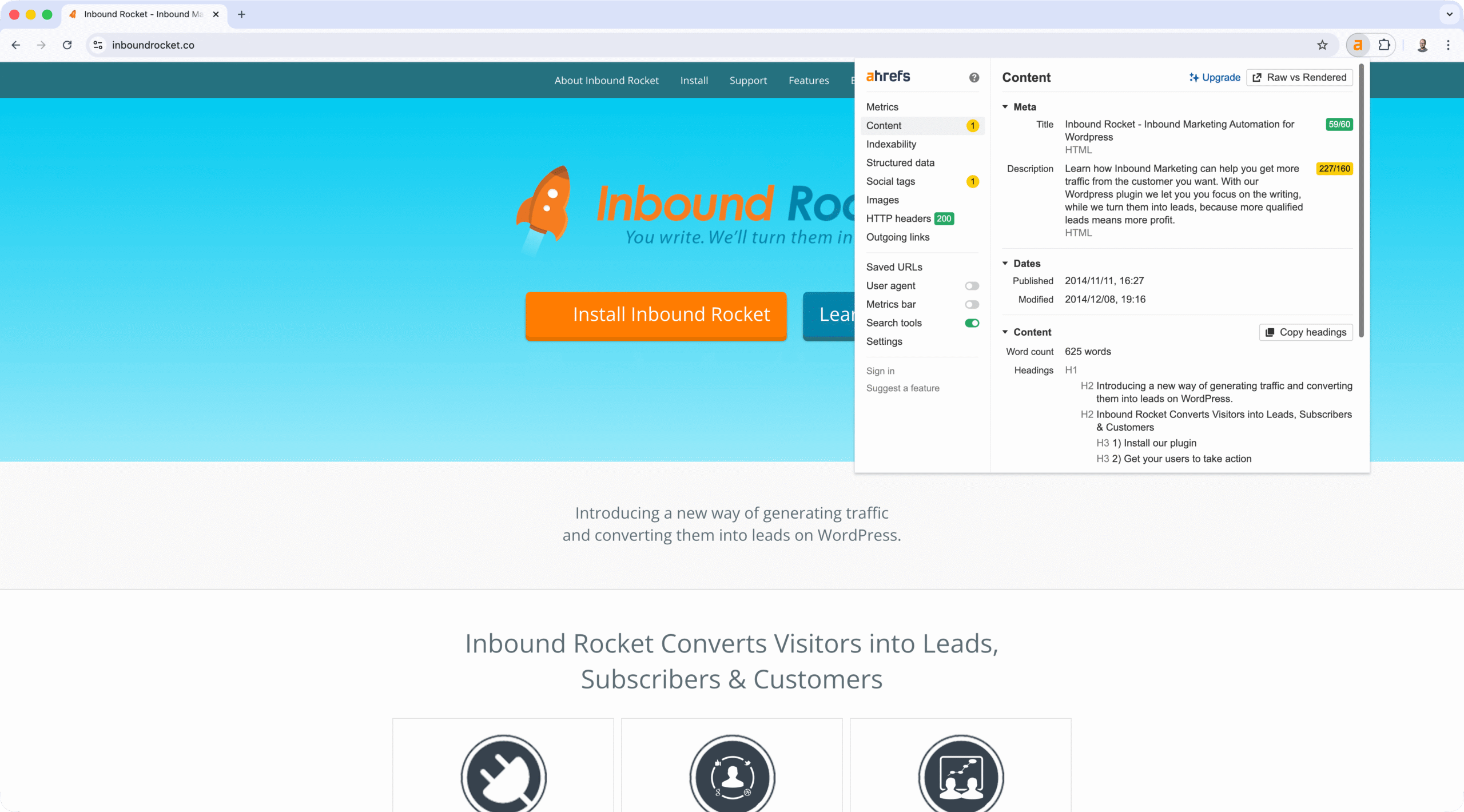
Ahrefs SEO Toolbar brings Ahrefs’ powerful SEO data directly into your browser, providing instant access to backlink metrics, keyword rankings, and on-page reports.
Core Features
The toolbar displays backlink metrics (referring domains, backlinks), keyword rankings, on-page SEO reports, Domain Rating (DR) and URL Rating (UR), top pages and top keywords, plus quick access to Ahrefs’ comprehensive platform.
Why Ahrefs Subscribers Use It
For Ahrefs subscribers, this extension provides instant access to Ahrefs’ comprehensive backlink and keyword data without leaving your browser. The index-backed metrics are among the most accurate available, making it valuable for competitive research and link building.
Pricing: Free (requires Ahrefs subscription for full features)
Browser Support: Chrome, Firefox
Install: Chrome Web Store | Website
5. Keywords Everywhere
Best for: Multi-platform keyword research
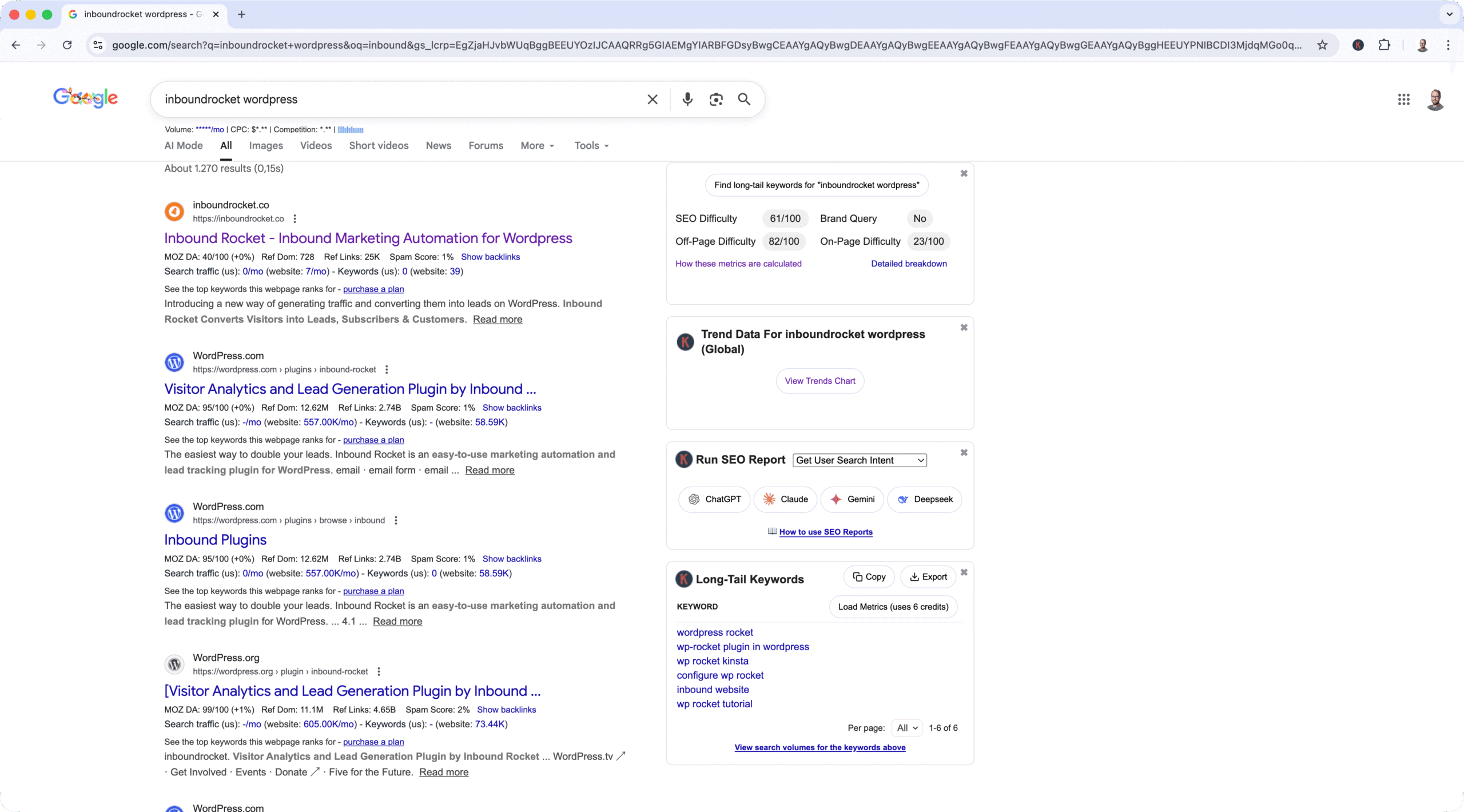
Keywords Everywhere displays keyword metrics directly in search results across multiple platforms, eliminating the need to switch between tools for keyword research.
Functionality
The extension shows search volume data, cost per click (CPC) information, and competition metrics directly in search results. It works on Google, Amazon, YouTube, Bing, and 15+ other platforms, providing related keyword suggestions with volume data.
Why Content Creators Love It
The seamless integration of keyword data across multiple platforms makes Keywords Everywhere invaluable. Instead of copying keywords into separate tools, you get volume and competition data exactly where you’re researching.
Pricing: Freemium (credits-based system)
Browser Support: Chrome, Firefox
Install: Chrome Web Store | Website
6. Keyword Surfer

Best for: Free keyword data in Google search results
Keyword Surfer provides keyword search volumes, related keywords, and on-page data directly within Google search results. It’s completely free, making it an excellent option for keyword research without subscription costs.
What You Get
The extension displays search volume for keywords, related keyword suggestions with volumes, estimated traffic for top-ranking pages, word count for top-ranking pages, and cost per click data, all directly in Google search results.
Why It’s Popular
Keyword Surfer’s integration directly into Google search results makes keyword research seamless. You get data exactly where you’re doing research, and it’s completely free, perfect for content creators and SEOs on a budget.
Pricing: Free
Browser Support: Chrome
Install: Chrome Web Store | Website
7. Detailed SEO Extension

Best for: Quick page and SERP overviews
Detailed SEO Extension provides a fast, comprehensive view of on-page SEO elements and SERP context. It’s designed for SEOs who need a quick snapshot without deep analysis.
Features
The extension displays title tags, meta descriptions, headings structure, canonical tags, Open Graph tags, and basic link information. It also provides SERP previews to see how titles and descriptions appear in search results.
Why It’s Useful
Detailed SEO Extension excels at giving you a complete picture of a page’s SEO setup in seconds. If you need a quick overview without diving into technical details, this extension delivers.
Pricing: Free
Browser Support: Chrome, Firefox
Install: Chrome Web Store | Website
8. Plerdy
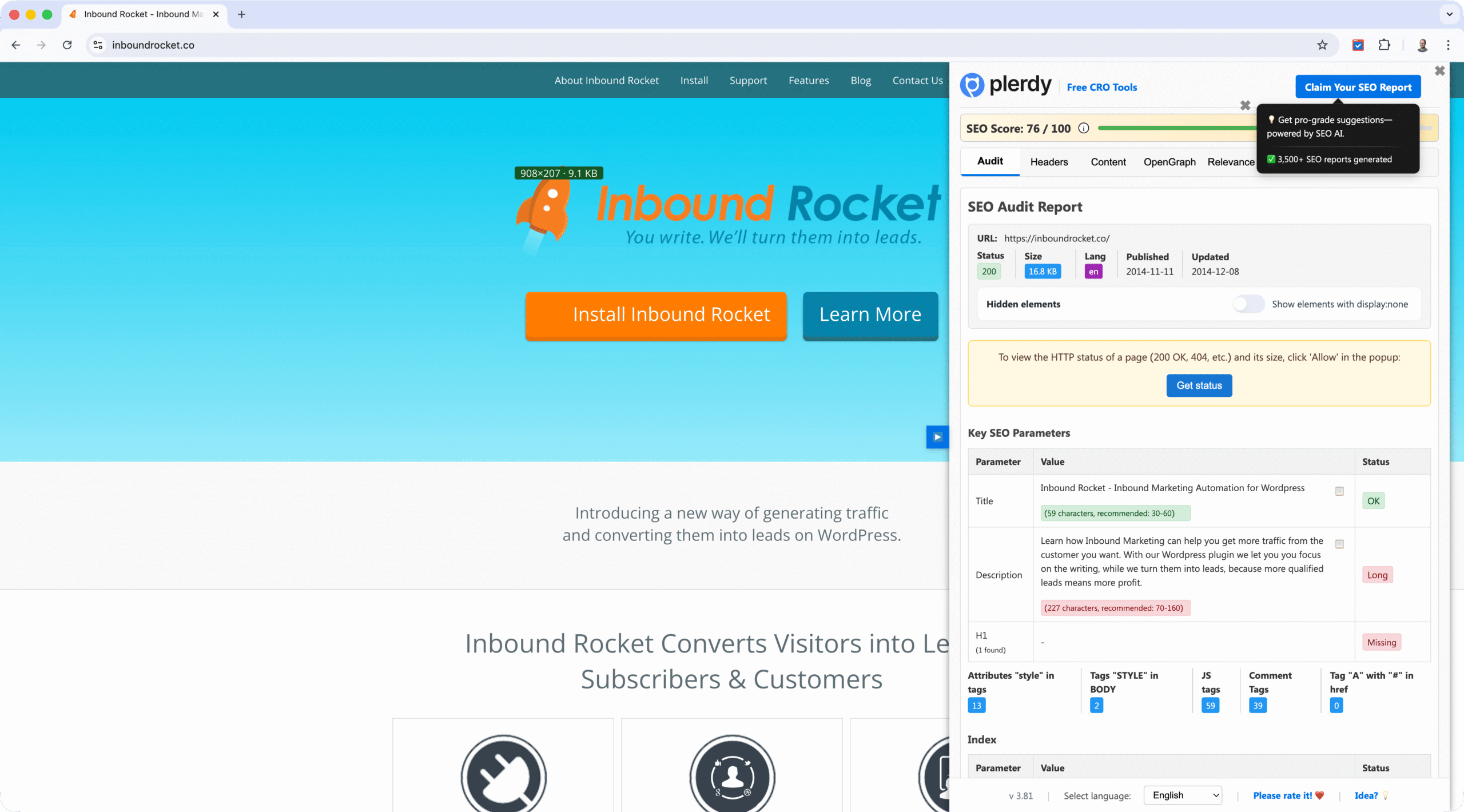
Best for: Quick SEO scoring and on-page analysis
Plerdy provides comprehensive on-page SEO analysis directly in your browser, offering instant SEO scores and detailed insights into page optimization.
What It Analyzes
The extension audits meta tags, headings structure, internal and external links, identifies broken elements, calculates an overall SEO score, and provides keyword relevance insights. It highlights optimization opportunities and flags issues that could impact rankings.
Why It’s Useful
Plerdy delivers a quick SEO health check with a single click. The SEO score gives you an instant snapshot of page quality, while detailed analysis helps you prioritize fixes. It’s particularly valuable for content creators and SEOs who need fast feedback on page optimization.
Pricing: Freemium (free tier available, premium features require subscription)
Browser Support: Chrome
Install: Chrome Web Store | Website
9. Wappalyzer
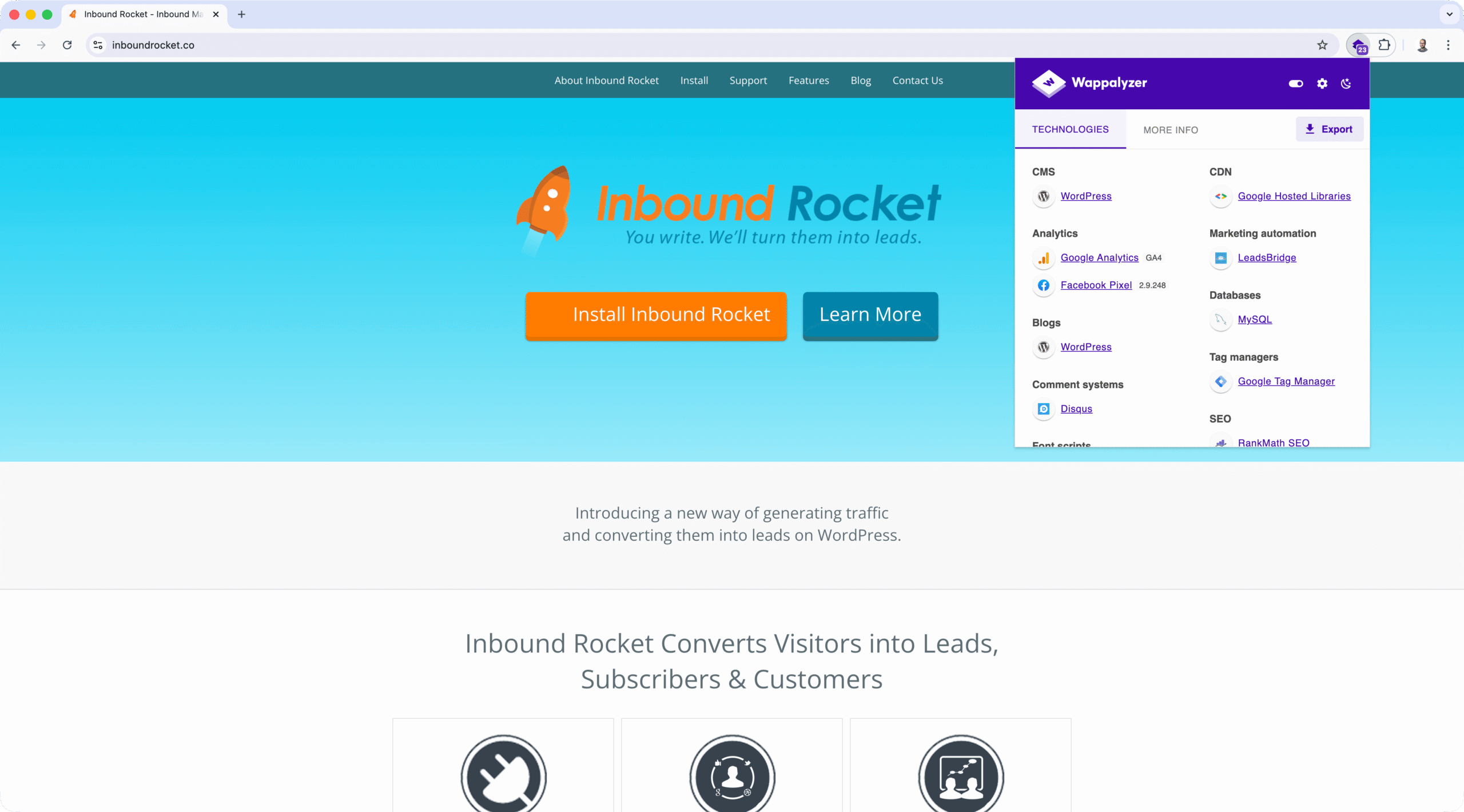
Best for: Technology stack detection and competitive intelligence
Wappalyzer identifies the technologies used on any website, helping you understand competitor tech stacks and make informed decisions about tools and platforms.
What It Reveals
The extension detects content management systems, e-commerce platforms, analytics tools, advertising networks, JavaScript frameworks, server software, and other technologies powering websites.
Why It Matters for SEO
Understanding what technologies competitors use helps you make informed decisions about your own stack. It’s also useful for identifying opportunities to improve your technical setup based on what successful sites are using.
Pricing: Free (premium features available)
Browser Support: Chrome, Firefox, Edge
Install: Chrome Web Store | Website
10. Check My Links
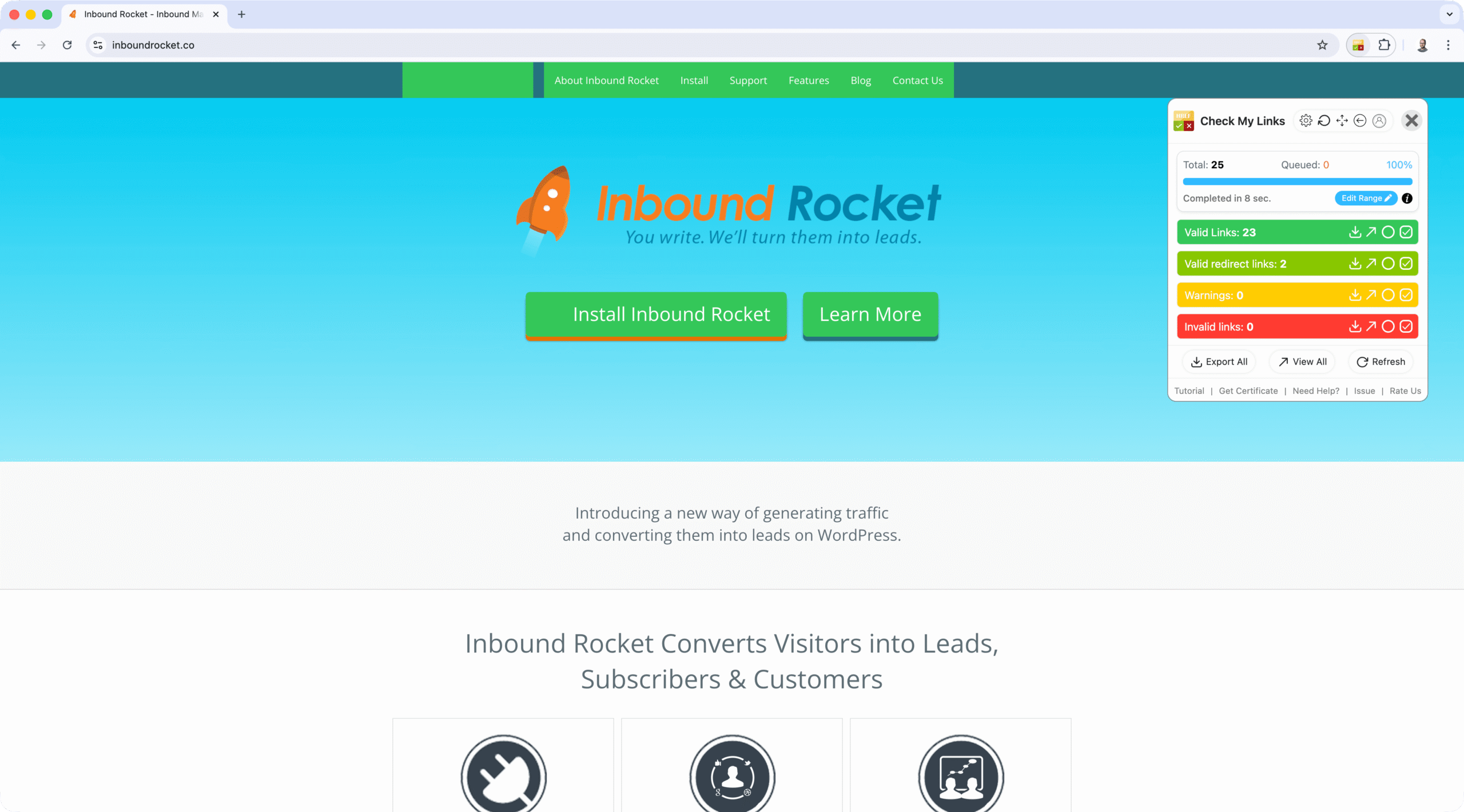
Best for: Fast broken link detection
Check My Links is a simple, focused tool that crawls through a webpage and identifies which links work and which are broken.
How It Works
The extension highlights valid links in green and broken links in red, provides a quick visual scan of page health, and allows you to copy all links to your clipboard for further analysis.
Why It’s Essential
For maintaining site health, Check My Links is indispensable. Its simplicity and speed make it perfect for regular link audits. The visual highlighting makes it easy to spot problems at a glance.
Pricing: Free
Browser Support: Chrome
Install: Chrome Web Store
11. Redirect Path
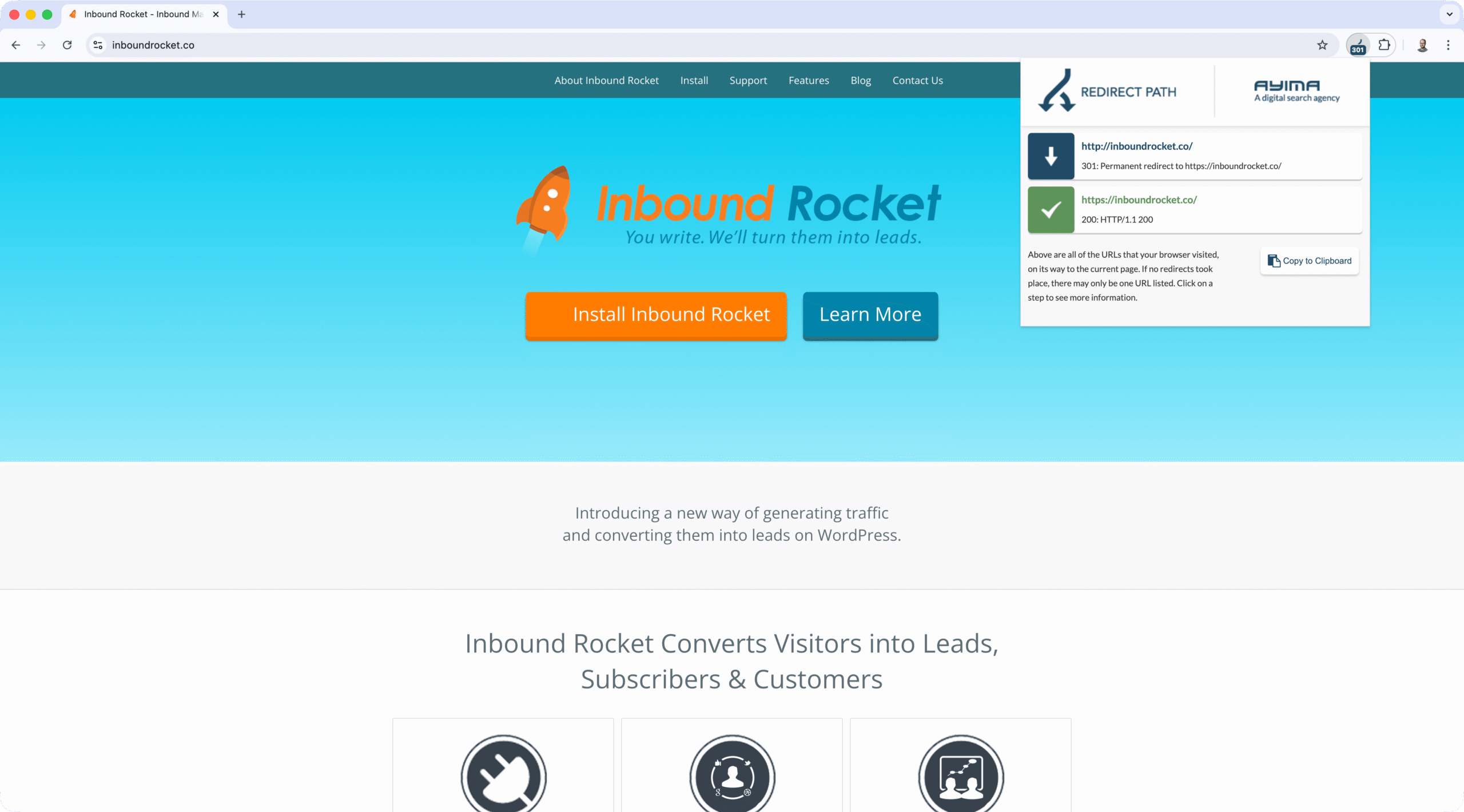
Best for: HTTP status code and redirect chain analysis
Redirect Path identifies HTTP status codes and redirects (301, 302, 404, 500) as well as meta and JavaScript redirects, helping you diagnose redirect issues that can impact SEO.
Functionality
The extension identifies HTTP status codes, visualizes redirect chains, displays server IP address, and shows HTTP headers information. This helps you understand the full redirect path and spot potential issues.
Why Technical SEOs Need It
Redirect Path is the go-to tool for diagnosing redirect issues, which are critical for maintaining SEO value during migrations and site restructures. The visual chain representation makes it easy to spot loops or unnecessary redirects.
Pricing: Free
Browser Support: Chrome
Install: Chrome Web Store
Selecting the Right Extensions for Your Workflow
Match Tools to Tasks
Different extensions excel at different jobs. Here’s how to match them to your needs:
Daily Page Audits
- Sprout SEO for comprehensive on-page and technical checks
- Detailed SEO Extension for quick overviews
- Check My Links for link health
Keyword Research
- Keywords Everywhere for multi-platform research
- Keyword Surfer for free Google search volume data
- SEOquake for SERP metrics
Competitive Analysis
- MozBar for Domain Authority and link metrics
- Ahrefs SEO Toolbar for backlink intelligence
- Wappalyzer for technology stack detection
Technical Validation
- Sprout SEO for comprehensive technical checks
- Redirect Path for redirect chain analysis
- Check My Links for broken link detection
Quick SEO Assessment
- Sprout SEO for comprehensive audits
- Plerdy for instant SEO scoring
- Detailed SEO Extension for quick overviews
Budget Considerations
Extensions range from completely free to requiring subscriptions:
Free Options
- Sprout SEO
- Detailed SEO Extension
- Keyword Surfer
- Check My Links
- Redirect Path
Freemium
- Keywords Everywhere
- Plerdy
- Wappalyzer
Requires Subscription
- MozBar (Moz Pro)
- Ahrefs SEO Toolbar (Ahrefs)
- SEOquake (SEMrush for premium features)
Many free tools are sufficient for most workflows. Start with free options and upgrade only when you need specific premium features.
Recommended Extension Combinations
Essential SEO Toolkit
- Sprout SEO for audits and technical validation
- Keywords Everywhere or Keyword Surfer for keyword research
- MozBar or Ahrefs SEO Toolbar for link metrics
This combination covers on-page, technical, keyword research, and link analysis without overwhelming your browser.
On-Page Optimization Workflow
- Sprout SEO for detailed technical validation
- Plerdy for quick SEO scoring and issue identification
- MozBar or Ahrefs SEO Toolbar for competitive context
This combination helps you quickly assess page health, identify optimization opportunities, and validate fixes efficiently.
Technical Audit Stack
- Sprout SEO for comprehensive on-page and technical checks
- Redirect Path for redirect analysis
- Check My Links for broken link detection
This bundle covers on-page, technical, and link health audits without subscription costs.
Security and Privacy Best Practices
Review Permissions Carefully
Extensions can read page HTML, form data, and network requests. Review permissions in the extension store listing before installing. Prefer extensions that request minimal, page-scoped permissions. Avoid tools that request global host access unless necessary for their core functionality.
When reviewing permissions, ask: Does this extension need access to all websites, or just the ones I’m actively viewing? Can it function with less access? Does the vendor clearly explain why each permission is needed?
Monitor Performance Impact
Some extensions add background processes that consume memory or CPU. Test with Lighthouse before and after installation to measure Core Web Vitals impact. Keep your extension set lean. Remove tools you don’t use regularly. Use separate browser profiles for testing vs. daily browsing.
A good practice is to install extensions one at a time and monitor performance. If you notice slowdowns, identify which extension is causing issues and consider alternatives.
Protect Client Data
Install only from official stores (Chrome Web Store, Firefox Add-ons). Check vendor privacy policies and changelogs for unexpected permission changes. For client work, use isolated browser profiles to protect sensitive data. Prefer extensions with clear export options so you retain control of your data.
Be particularly careful with extensions that request access to all websites or browsing history. These permissions increase privacy risk, so only grant them to extensions you fully trust.
Avoid Extension Conflicts
Don’t run multiple overlapping tools that inject into the DOM simultaneously. Prefer one authoritative metric extension rather than several competing tools. Test extensions in a fresh browser profile first to isolate effects.
If you notice extensions conflicting (e.g., multiple SERP overlays competing for space), choose one primary tool for each function rather than running several similar extensions.
Installation and Management Tips
Safe Installation Process
- Install from official stores only (Chrome Web Store, Firefox Add-ons)
- Verify publisher details and check recent update dates
- Review required permissions before granting access
- Pin extensions to toolbar for easy access
Before installing, read recent reviews to check for issues or concerns. Look for extensions with active development (recent updates) and responsive developers.
Effective Extension Management
- Enable incognito mode only for extensions you fully trust. Incognito access is powerful and should be granted sparingly.
- Periodically review and remove unused extensions. Every extension adds potential security surface area.
- Keep extensions updated to the latest versions. Updates often include security patches.
- Document your extension stack for team consistency. Create a shared list of approved extensions.
Exporting and Sharing Data
- Use built-in CSV exports or copy data to Google Sheets for easy sharing and analysis
- Standardize column names and include timestamps for automation and tracking
- Create scheduled exports where possible for recurring reports
- Integrate exports into your ticketing or reporting workflows to streamline processes
Many extensions offer export features, but formats vary. Choose extensions with export capabilities that match your workflow needs.
Comparison Table: Quick Reference
| Extension | Price | Best For | Export | Browser Support | Key Differentiator |
|---|---|---|---|---|---|
| Sprout SEO | Free | Comprehensive audits, technical SEO, SERP insights | CSV | Chrome, Firefox, Edge | Complete workflow tool with deep technical validation and export capabilities |
| SEOquake | Free (premium with SEMrush) | SERP metrics, on-page audits | Yes | Chrome, Firefox | Comprehensive metric overlay |
| MozBar | Free (premium with Moz Pro) | Domain/Page Authority, link metrics | Limited | Chrome, Firefox | Moz ecosystem integration |
| Ahrefs SEO Toolbar | Free (requires Ahrefs) | Backlink analysis, keyword rankings | CSV/JSON | Chrome, Firefox | Index-backed metrics |
| Keywords Everywhere | Freemium | Keyword research across platforms | Limited | Chrome, Firefox | Multi-platform integration |
| Keyword Surfer | Free | In-SERP keyword volumes | No | Chrome | Free keyword estimates |
| Detailed SEO Extension | Free | Quick page and SERP overviews | No | Chrome, Firefox | Fast comprehensive view |
| Plerdy | Freemium | Quick SEO scoring and on-page analysis | Limited | Chrome | Instant SEO health checks |
| Wappalyzer | Free (premium available) | Technology stack detection | Limited | Chrome, Firefox, Edge | Competitive tech intelligence |
| Check My Links | Free | Broken link detection | Copy to clipboard | Chrome | Focused link checking |
| Redirect Path | Free | HTTP status and redirects | No | Chrome | Status code visualization |
Conclusion
The right SEO browser extensions can transform how you work, providing instant insights and saving hours of manual effort. Whether you need comprehensive audits, quick spot checks, or specialized tools for keyword research and competitive analysis, there’s an extension that fits your needs.
For most SEO professionals, a strategic combination works best:
- Sprout SEO for comprehensive on-page and technical analysis, Core Web Vitals, and SERP insights
- Keywords Everywhere or Keyword Surfer for keyword research
- MozBar or Ahrefs SEO Toolbar for link metrics (depending on your preferred tool)
- Plerdy for quick SEO scoring and optimization insights
- Wappalyzer for competitive technology intelligence
Start with the tools that match your most frequent tasks, and build your toolkit from there. The best extension is the one you’ll actually use every day. Remember to review permissions, test performance impact, and keep your extension set focused to avoid conflicts and slowdowns.
Most importantly, don’t install extensions just because they exist. Choose tools that solve real problems in your workflow. A lean, focused set of extensions will serve you better than a cluttered toolbar full of tools you rarely use.
Frequently Asked Questions
What’s the best extension for comprehensive SEO audits?
Sprout SEO is the strongest option for comprehensive audits. It covers on-page elements, technical validation, SERP insights, Core Web Vitals, structured data, and export capabilities in one tool. The extension provides complete technical validation without requiring multiple tools.
Are browser extensions safe for client work?
Extensions request permissions that can expose browsing data. Minimize risk by installing only from official stores, reviewing permissions, and using separate browser profiles for client work. Prefer extensions with clear privacy policies and export options. For sensitive client work, consider using a dedicated browser profile with only essential extensions.
Do extensions slow down my browser?
Some extensions add background processes that consume memory. Keep your extension set lean, remove unused tools, and test with Lighthouse before and after installation to measure impact. Most well-designed extensions have minimal performance impact, but running many extensions simultaneously can slow down your browser.
How many extensions should I install?
There’s no fixed safe number, but fewer is better. Keep a lean set for daily browsing (2-4 core tools) and use separate profiles for testing. Focus on extensions that cover multiple needs (like Sprout SEO) rather than installing many single-purpose tools. Quality over quantity applies here.
Can extensions replace enterprise SEO platforms?
Extensions excel at quick, on-page checks and triage, but they don’t replace full-site crawlers, server log analysis, or comprehensive enterprise platforms. Use extensions for fast diagnostics and validation, then escalate to deeper tools when patterns emerge. Think of extensions as your first line of defense, not your complete SEO toolkit.
Which extensions provide the best SEO scoring?
Plerdy offers instant SEO scoring with detailed breakdowns. Sprout SEO provides comprehensive audits with automated scoring (0-100) and prioritized recommendations. Both tools help you quickly assess page health and identify optimization opportunities, with Sprout SEO offering deeper technical validation and export capabilities.
Should I use multiple extensions that do similar things?
Generally, no. Running multiple extensions with overlapping functionality can cause conflicts, performance issues, and confusion. Choose one primary tool for each function (e.g., one for audits, one for keyword research, one for link metrics) rather than installing several similar extensions. This keeps your browser fast and your workflow clean.
Get Started Today
Install your first extension and see the difference it makes. Choose Sprout SEO for comprehensive audits, Keywords Everywhere for research, or any tool that matches your immediate needs. Test it on a real page you’re working on today. Export your findings, share them with your team, and build your extension toolkit one tool at a time. The right combination of extensions will save hours every week and help you deliver better results faster.